J
j-l-n
Guest
Da müsste irgendwostehen - da kannst du direkt dahinter das .bind() packen.Code:$("irgendein Selektor").fileupload({/*eventuelle Parameter*/});
Super, danke. Ich schau dann mal demnächst nach...

Follow along with the video below to see how to install our site as a web app on your home screen.

Anmerkung: This feature currently requires accessing the site using the built-in Safari browser.
Da müsste irgendwostehen - da kannst du direkt dahinter das .bind() packen.Code:$("irgendein Selektor").fileupload({/*eventuelle Parameter*/});
Das kann ich dir leider nicht sagen, da ich den Code, wo du den fileupload initialisierst nicht kenne.
Da müsste irgendwostehen - da kannst du direkt dahinter das .bind() packen.Code:$("irgendein Selektor").fileupload({/*eventuelle Parameter*/});
            // The add callback is invoked as soon as files are added to the fileupload
            // widget (via file input selection, drag & drop, paste or add API call).
            // If the singleFileUploads option is enabled, this callback will be
            // called once for each file in the selection for XHR file uplaods, else
            // once for each file selection.
            // The upload starts when the submit method is invoked on the data parameter.
            // The data object contains a files property holding the added files
            // and allows to override plugin options as well as define ajax settings.
            // Listeners for this callback can also be bound the following way:
            // .bind('fileuploadadd', func);
            // data.submit() returns a Promise object and allows to attach additional
            // handlers using jQuery's Deferred callbacks:
            // data.submit().done(func).fail(func).always(func);
            add: function (e, data) {
                if (data.autoUpload || (data.autoUpload !== false &&
                        ($(this).data('blueimp-fileupload') ||
                        $(this).data('fileupload')).options.autoUpload)) {
                    data.submit();
                }
}, if (xhr.upload) {
$(xhr.upload).bind('progress', function (e) {
var oe = e.originalEvent;
// Make sure the progress event properties get copied over:
e.lengthComputable = oe.lengthComputable;
e.loaded = oe.loaded;
e.total = oe.total;
that._onProgress(e, options);
});
options.xhr = function () {
return xhr;
};Ich glaube, du suchst in den falschen Dateien - das muss irgendwo in deinem eigenen JS stehen und nicht in dem vom Plugin.
    $('#upload').fileupload({

        // This element will accept file drag/drop uploading
        dropZone: $('#drop'),

        // This function is called when a file is added to the queue;
        // either via the browse button, or via drag/drop:
        add: function (e, data) {

            var tpl = $('<li class="working"><input type="text" value="0" data-width="48" data-height="48"'+
                ' data-fgColor="#0788a5" data-readOnly="1" data-bgColor="#3e4043" /><p></p><span></span></li>');

            // Append the file name and file size
            tpl.find('p').text(data.files[0].name)
                         .append('<i>' + formatFileSize(data.files[0].size) + '</i>');

            // Add the HTML to the UL element
            data.context = tpl.appendTo(ul);

            // Initialize the knob plugin
            tpl.find('input').knob();

            // Listen for clicks on the cancel icon
            tpl.find('span').click(function(){

                if(tpl.hasClass('working')){
                    jqXHR.abort();
                }

                tpl.fadeOut(function(){
                    tpl.remove();
                });

            });

            // Automatically upload the file once it is added to the queue
            var jqXHR = data.submit();
        },

        progress: function(e, data){

            var progress = parseInt(data.loaded / data.total * 100, 10);

      data.context.find('input').val(progress).change();

            if(progress == 100){
                data.context.removeClass('working');
            }
        },

        fail:function(e, data){
            // Something has gone wrong!
            data.context.addClass('error');
		       alert("Upload fehlgeschlagen!\n\nEs ist ein Fehler während des Uploads aufgetreten.");
        }

});schau' dir an, ob im data-Objekt deine Nachricht drin ist.
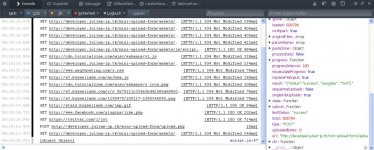
//...
progress: function(e, data){

// Calculate the completion percentage of the upload
var progress = parseInt(data.loaded / data.total * 100, 10);

// Update the hidden input field and trigger a change
// so that the jQuery knob plugin knows to update the dial
data.context.find('input').val(progress).change();

if(progress == 100){
   data.context.removeClass('working');
}
},

done: function(e, data){
         console.log(data);
},

fail:function(e, data){
     // Something has gone wrong!
     data.context.addClass('error');
}
//...Sehr gut. data.result kannst du jetzt an JSON.parse() übergeben.
var json = data.result;
var json_content = JSON.parse(json);

alert(json_content.ausgabe); //erwarte "Test"
